
To Add a User
Those with admin privileges may grant other users access to the project. Before adding a new user to the project, please ensure these individuals have been added to the appropriate IRB protocol and have completed CITI training, if applicable. Once this is complete, log in to REDCap and open your project.
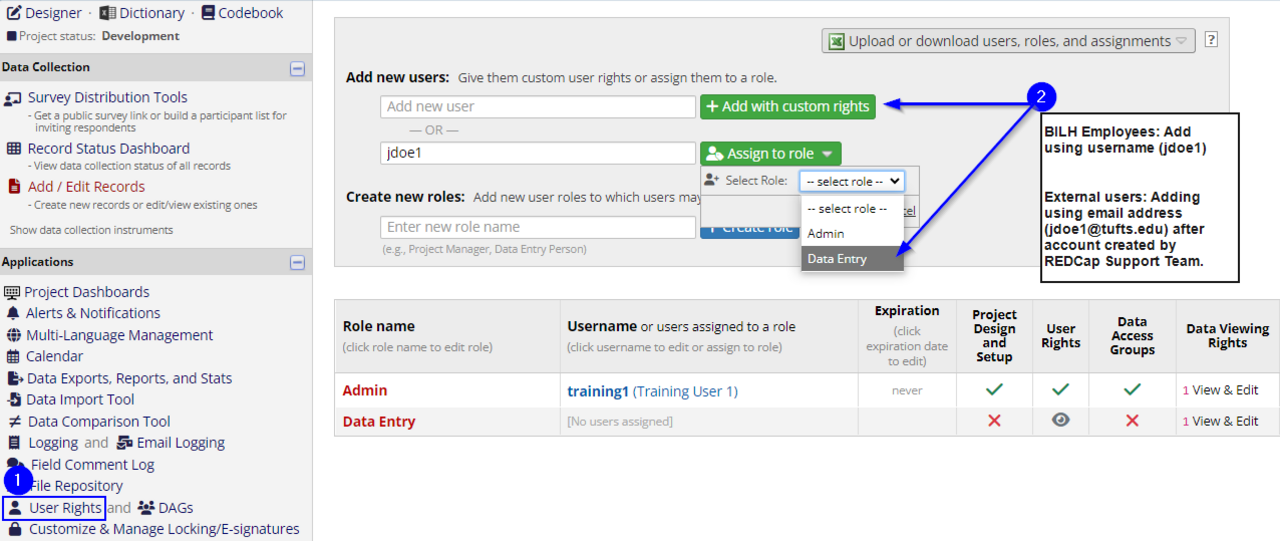
1. In the left hand navigation bar under Applications, select User Rights.
2. On the User Rights page:
- To grant custom rights, click inside the first box ('Add with custom rights') and start typing in the name of the user. Select their username when the type-ahead brings up their name. The Edit User dialog will open, and allow you to set their custom rights. Click "Save" in the lower right hand corner.
- To grant rights via a role(such as "Data Entry"), use the second box ('Assign to role'), and start typing in the name of the individual. When their name come up, click it, and then click the Assign to role button to add them to the role. See picture below.
- A role is a group of users that have the same rights. Project admins may create roles such as “Data Entry”, “Project Manager”, etc. and then add users to them. Roles provide better user management than custom rights and are faster.
BILH/BIDMC employees must always be added via their username, not their email address. If added correctly, their account will appear as username (name), such as jdoe1 (John Doe).
If you start typing in the person's name in either box, their username will appear via type-ahead. If it does not, it means they have never logged into REDCap before or their account is suspended. Ask them to log in and set-up their account using the on-screen instructions, or contact REDCap Support for assistance in re-activating their account.
BILH/BIDMC employees have access to REDCap automatically via their ITS account, and can log in with their usual username and password. No account needs to be requested on their behalf. Accounts do need to be requested for external users, such as those at MGH, Tufts, or other institutions. External users are added using their full e-mail address, unlike employees, because their email address creates a unique username for them.