

Answer
Calculations in REDCap are generally performed only when a form containing the calculation (whether a calculated field, a @CALCDATE or @CALCTEXT) is opened for that record. Use Rule H to update the calculations in all records without you having to open each record individually.
This is important when:
- Adding a new calculation (calculated field, @CALCDATE, and @CALCTEXT) to a project that already has records.
- Updating an existing calculation
- If any of the fields used in the calculation come from other forms. The input form may be updated, but if the form containing the calculation has not been opened since, then the calculation may have an old value.
If your project contains calculations, it is a good idea to run Rule H periodically, especially before doing a data export, to be sure your calculations are up-to-date in each record.
Run Rule H
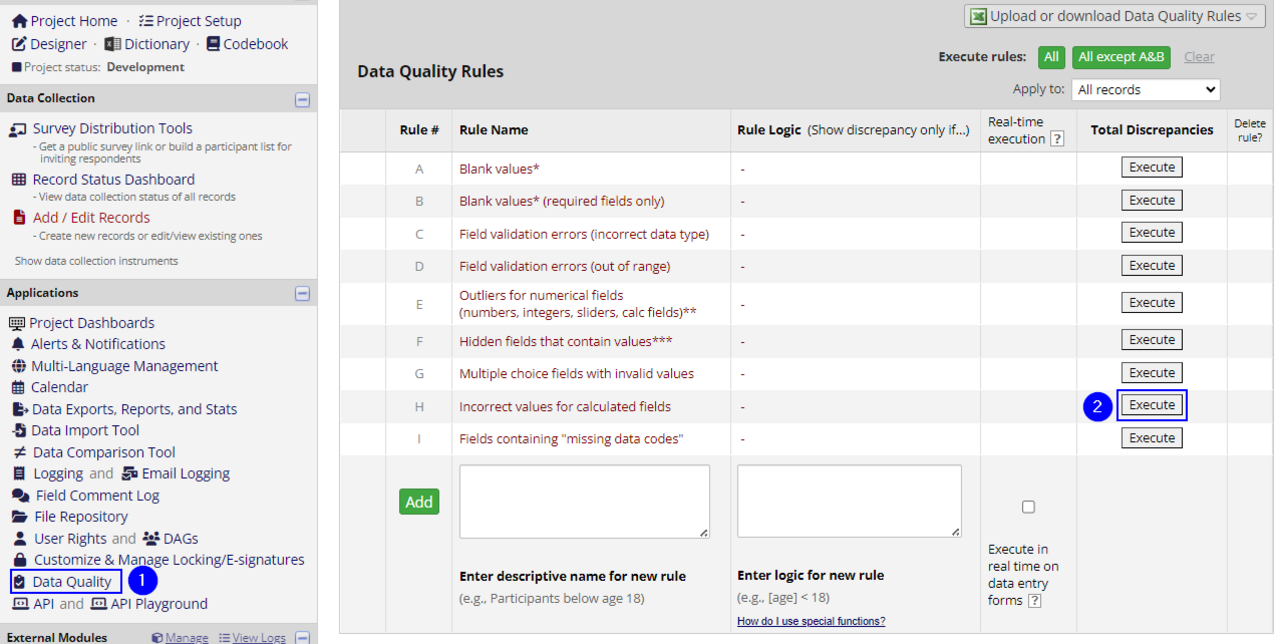
- On the left hand navigation bar, click the "Data Quality Rules".
- On the line for Rule H, click the Execute button.
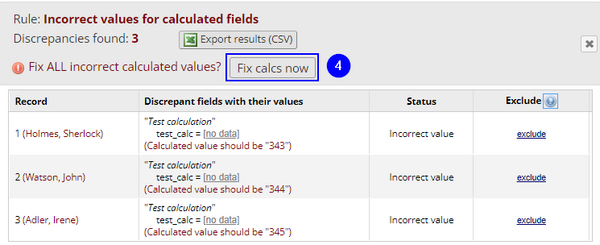
- Once it has run, click on the tiny "View" link.
- In the resulting pop-up box, click "Fix calcs now".
- If this is a new calculation, do a quick manual check that the answers are correct- it is very easy to have a typo that throws a calculation off.

See also:
Calculations, Action Tags
