
Note: Text below originates from the REDCap Help & FAQ text:
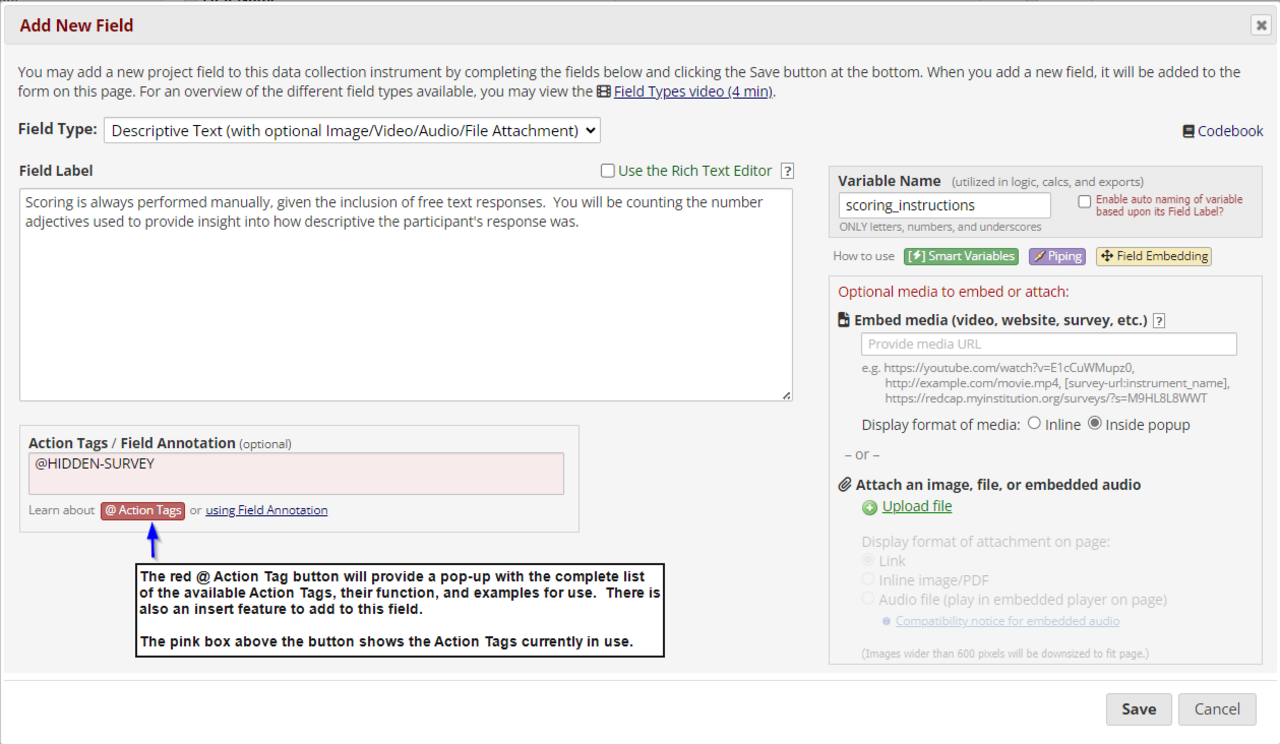
Action Tags are special terms that begin with the '@' sign that can be placed inside a field's Field Annotation. Each action tag has a corresponding action that is performed for the field when displayed on data entry forms and survey pages. Such actions may include hiding or disabling a given field (either on a survey, data entry form, or both).
There is a comprehensive list of all available action tags that you may use within the Online Designer "Edit Field" pop up box. You can use as many as you want for a single field, but if you do use more than one tag for a field, make sure to put a space or line break between them. Because the action tags are used as part of the Field Annotation, they are not displayed anywhere on the page. For example, if you put @HIDDEN-SURVEY in a field's Field Annotation text box, then the field will always stay hidden when viewed on a survey page, but the field will be visible when viewing the same instrument as a data entry form, which might be helpful if you want to hide specific fields from your survey participants so that they do not see them. There are many different use cases for each action tag.